MAHANAKHON RACING controls (PC and phone) (Roblox)
The game description publishes one keyboard list. A Thai post on 31 Oct repeats it, including the line that W fails when the kickstand is down.
Last checked 2026-11-05
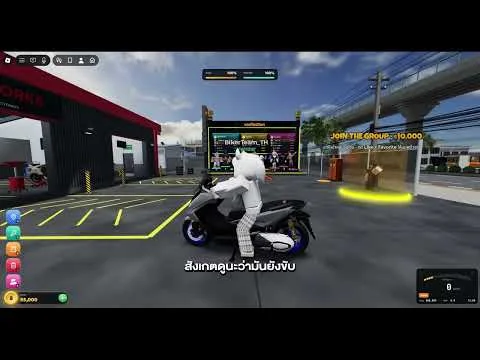

Both sources start the same way: G spawns the bike, E mounts, R starts the engine, K raises the kickstand, then W moves. Holding S while parked is reverse. There is no separate reverse key.
Hold Ctrl to lift the front wheel. P works at a customization point. Hold J to store the bike. Space dismounts. E and Space are different keys.
Phones have no keyboard. The post says to use the on-screen buttons. I have no shot of that layout, so I do not draw a phone map.
I have no source for a gamepad or for rebinding. Those columns stay off the table.
- Press G to spawn
- Walk up and press E
- Press R to start
- Press K for the kickstand
- Press W to roll
— means the public sources do not state the value; source counts refer to linked pages, not independent confirmations.
| Name | Action | Phone | Group | Evidence status | Sources / checked |
|---|---|---|---|---|---|
| G | Spawn a motorcycle | On-screen controls; individual positions not documented | Starting | Official record | |
| E | Mount | On-screen controls; individual positions not documented | Starting | Official record | |
| R | Start engine | On-screen controls; individual positions not documented | Starting | Official record | |
| K | Retract kickstand | On-screen controls; individual positions not documented | Starting | Official record | |
| W | Accelerate | On-screen controls; individual positions not documented | Starting | Official record | |
| S | Brake; hold while parked to reverse | On-screen controls; individual positions not documented | Riding | Official record | |
| Shift | Brake | On-screen controls; individual positions not documented | Riding | Official record | |
| A | Steer left | On-screen controls; individual positions not documented | Riding | Official record | |
| D | Steer right | On-screen controls; individual positions not documented | Riding | Official record | |
| Ctrl | Hold to wheelie | On-screen controls; individual positions not documented | Riding | Official record | |
| Q | Tuck | On-screen controls; individual positions not documented | Riding | Official record | |
| Space | Dismount | On-screen controls; individual positions not documented | Dismount / store | Official record | |
| Z | Left indicator | On-screen controls; individual positions not documented | Lights / horn | Official record | |
| C | Right indicator | On-screen controls; individual positions not documented | Lights / horn | Official record | |
| X | Hazard lights | On-screen controls; individual positions not documented | Lights / horn | Official record | |
| H | Horn | On-screen controls; individual positions not documented | Lights / horn | Official record | |
| L | Decorative lights | On-screen controls; individual positions not documented | Lights / horn | Official record | |
| V | Change camera | On-screen controls; individual positions not documented | Camera / menus | Official record | |
| M | Mirrors | On-screen controls; individual positions not documented | Camera / menus | Official record | |
| P | Customize at a customization point | On-screen controls; individual positions not documented | Camera / menus | Official record | |
| N | Warp | On-screen controls; individual positions not documented | Camera / menus | Official record | |
| F | Phone | On-screen controls; individual positions not documented | Camera / menus | Official record | |
| J | Hold to store motorcycle | On-screen controls; individual positions not documented | Dismount / store | Official record | |
| Y | Free camera | On-screen controls; individual positions not documented | Camera / menus | Official record |
FAQ
How do I wheelie?
Hold Ctrl, as the description states.
What is reverse?
Hold S while parked. The list has no extra reverse key.
Sources
- Roblox game page · 2026-11-05
- Facebook guide · 2026-11-05
- Wiki controls · 2026-11-05