How to redeem MAHANAKHON RACING codes (Roblox)
On PC the string is typed in-game under Store, then Codes. I have no phone shot of that panel, so I do not copy the PC steps onto mobile.
Last checked 2026-11-05
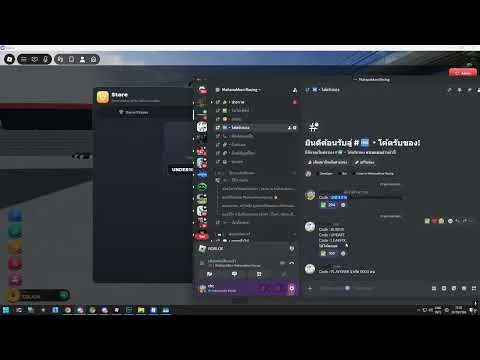
A 1280×720 clip from 31 Oct 2026 walks this path from about 00:12 to 00:44. The four tabs are Game Passes, Gifts, Money, and Codes.
The Thai search for game passes points at the Game Passes tab, not Codes. They share one window, which is why people miss the box.
The code written on the game description is all capitals. I found no line that says whether lowercase is accepted, so I leave that open.
Phones use on-screen buttons, according to the game description. No public frame shows the redeem panel on a phone, so the button position stays blank.
- Open the experience in Roblox and use the gold crown button labeled Store on the left rail.
- In the Store window choose the Codes tab. Game Passes is a different tab in the same window.
- Read Redeem a code, then type into the box labeled ENTER CODE.
- Press Redeem. A success line reads Code redeemed plus a number, and the string joins the Redeemed list.
- If the line says This code has run out, that frame treats the string as spent.
FAQ
Can I redeem on this website?
No. The box is inside the experience.
The reward did not show up
If there is no success line, I have no second source for a delay. Check the Redeemed list on that panel first.
Sources
- YouTube redeem clip · 2026-11-05
- RBX Radar codes · 2026-11-05
- Wiki codes · 2026-11-05